

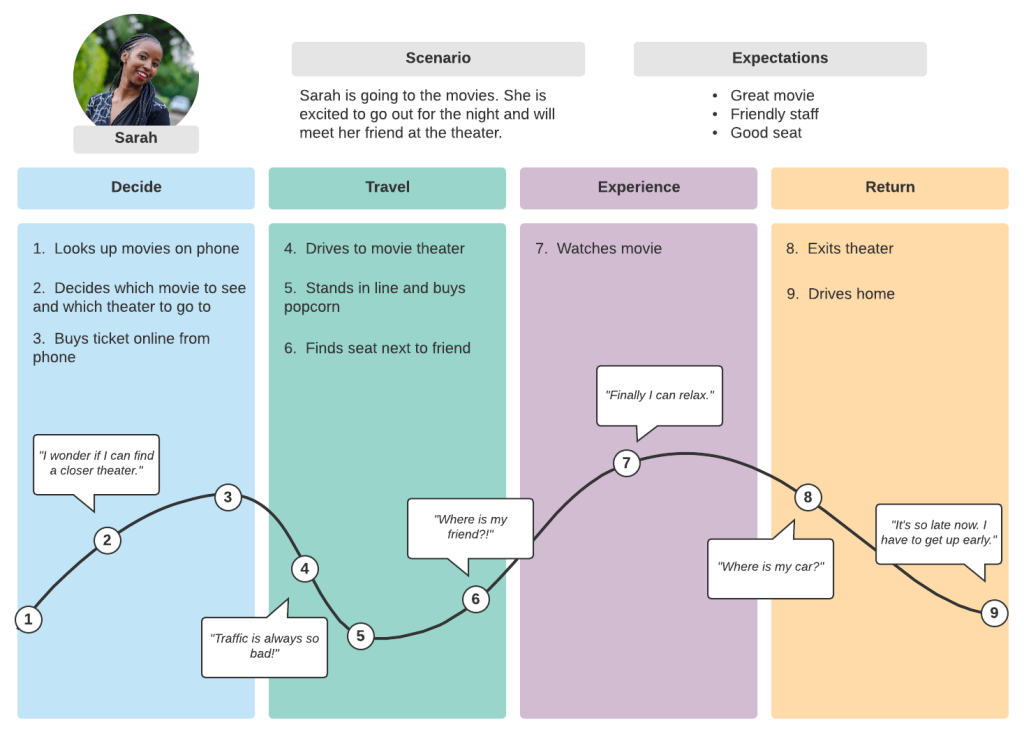
You know that feeling when you call support and have to repeat your issue for the third time? It’s frustrating, right? Now imagine the opposite—where the agent already knows your product history, your last chat, and even that you prefer email over phone calls. That’s not magic. That’s behavioral segmentation. And honestly, it’s the difference between support that feels like a chore and support that feels… almost human.
Here’s the deal: most companies treat every customer the same. One-size-fits-all scripts, generic FAQs, and tier-one agents reading from a manual. But your customers aren’t the same. They behave differently—some are power users, some are newbies, some are angry, some are just curious. Behavioral segmentation lets you tailor every support interaction based on how someone actually uses your product. Not their age, not their job title—their actions.
What Exactly Is Behavioral Segmentation?
Let’s break it down without the jargon. Behavioral segmentation is grouping your users based on their observed actions—what they click, when they log in, how often they buy, which features they ignore, and even how they’ve contacted support before. It’s not about guessing who they are. It’s about watching what they do.
Think of it like a bartender who remembers your usual order. They don’t ask your name or your job. They just see you walk in, and they start pouring your drink. That’s behavioral data in action. For support, that means if a user has opened five tickets about billing in the last month, you don’t send them a generic “How can we help?” email. You send them a direct link to your payment portal with a note that says, “We see you’ve had some trouble—here’s a shortcut.”
The Core Types of Behavioral Data That Matter
Not all behavior is equal. Sure, you could track every mouse move, but that’s overkill. Here are the four buckets that actually move the needle for support personalization:
- Usage frequency: Daily active users vs. weekly vs. once-a-month lurkers. A newbie who logs in daily needs different help than a veteran who only pops in for one feature.
- Feature adoption: Which tools do they use? If they’ve never touched the reporting dashboard, don’t offer advanced report troubleshooting. Show them a beginner’s guide instead.
- Purchase history & lifecycle stage: A trial user, a first-time buyer, and a three-year loyalist have completely different pain points. A trial user might need onboarding help; a loyalist might need renewal options.
- Support interaction patterns: Do they prefer live chat? Do they open tickets at 2 AM? Do they get frustrated easily (detected by sentiment analysis)? This tells you how to deliver help, not just what to deliver.
Honestly, the last one is gold. If someone always uses live chat and never emails, why would you send them a long-form article? Send a quick chat snippet. Meet them where they already are.
Why This Matters More Than Ever (The Pain Point)
Let’s face it—customer expectations have skyrocketed. A 2023 survey found that 73% of customers expect companies to understand their unique needs. Not just their name. Their needs. And here’s the kicker: 54% of customers say they feel like they’re talking to a robot, even when it’s a human. That’s a direct result of ignoring behavioral signals.
When you don’t personalize, you’re not just losing a ticket resolution. You’re losing trust. And trust is expensive to rebuild. Behavioral segmentation flips that script. It shows the customer, “We see you. We remember you. We’re not starting from zero every time.”
One quick example. A SaaS company I worked with had a huge churn problem. Users would sign up, use the tool for two weeks, then vanish. They tried email campaigns, discounts—nothing worked. Then they segmented by behavior. They found that users who never set up integrations within the first 7 days had a 90% churn rate. So they built a support flow that triggered a personalized walkthrough for those users, right when they hit day 5. Churn dropped by 18% in two months. That’s not a guess—that’s behavior-driven support.
How to Actually Implement Behavioral Segmentation in Support
Alright, so you’re sold on the “why.” Now the “how.” It’s not as scary as it sounds. You don’t need a data science team. You need a clear plan and the right tools.
Step 1: Define Your Behavioral Events
Start small. Pick 5–10 key actions that matter for your product. For an e-commerce site: cart abandonment, repeat purchase, returns. For a SaaS tool: feature usage, login frequency, ticket history. Write them down. Don’t overthink it. You can always add more later.
Step 2: Tag and Track (Without Creeping People Out)
Use tools like Mixpanel, Amplitude, or even your helpdesk’s built-in analytics. The key is to tag events consistently. And please—don’t be creepy about it. You don’t need to know their shoe size. Just their product behavior. Privacy matters, so keep it anonymized where possible and always be transparent in your privacy policy.
Step 3: Create Dynamic Support Flows
This is where the magic happens. Instead of one static help center, create conditional content. For example:
- If a user has logged in 10 times but never used the “export” feature, show them a pop-up with a 30-second video on exporting.
- If a user has submitted 3+ tickets about the same issue, automatically escalate them to a senior agent who has context on their history.
- If a user is on a free trial and hasn’t used the product in 3 days, send a support email that says, “We noticed you paused—here’s a quick tip to get back on track.”
These aren’t just nice-to-haves. They’re strategic interventions that reduce friction and increase resolution speed.
Step 4: Train Your Agents to Use the Data
Your agents are the front line. If they don’t know how to read a behavioral profile, the data is useless. Give them a quick dashboard that shows: “This user is a power user, prefers chat, has 2 open tickets, last interaction was 3 days ago.” That’s all they need. No deep dives. Just enough to personalize the conversation.
Real-World Examples (Because Theory Is Boring)
Let’s look at two companies doing this right.
Slack is a master at this. When you’re a new workspace admin, their support center shows you onboarding checklists. But if you’re a power user who’s been using Slack for years, you get advanced shortcuts and API docs. They don’t show the same content to everyone. Their help center literally changes based on your usage tier.
Zappos (yes, the shoe company) uses behavioral data to predict returns. If a customer has a history of ordering two sizes and returning one, they proactively offer a free return label and a “size guarantee” note. They don’t wait for the customer to complain. They’ve already segmented that behavior and built a support flow around it.
See the pattern? It’s not about being psychic. It’s about being prepared.
Common Pitfalls to Avoid (Trust Me, I’ve Seen Them)
Behavioral segmentation isn’t a silver bullet. It can go sideways fast if you’re not careful. Here’s what to watch out for:
- Over-segmentation: If you create 50 different segments, you’ll drown in complexity. Start with 5–7. Seriously.
- Ignoring context: Just because someone hasn’t logged in for a week doesn’t mean they’re angry. Maybe they’re on vacation. Don’t send a passive-aggressive “We miss you!” email. Use other signals—like support tickets or purchase history—to confirm intent.
- Static rules: Behavior changes. What worked last month might not work today. Review your segments quarterly. Adjust. Iterate.
- Forgetting the human: At the end of the day, a person is on the other side. If the data says “send a discount,” but the customer is clearly frustrated about a bug, send empathy first. Discounts later.
Measuring Success: What to Track
You can’t improve what you don’t measure. But don’t just track ticket volume. Track the quality of the interaction. Here’s a simple table to get you started:
| Metric | What It Tells You | Target Improvement |
|---|---|---|
| First Contact Resolution (FCR) | Did you solve it on the first try? | +10% after segmentation |
| Customer Effort Score (CES) | How easy was it to get help? | Lower is better |
| Repeat Contact Rate | Are they coming back with the same issue? | -15% within 30 days |
| Sentiment Score | Are they happier after the chat? | +5 points on average |
These numbers don’t lie. If you see improvement in FCR and CES, you’re on the right track. If not, go back to your segments and refine.
The Future Is Behavioral (And It’s Already Here)
We’re moving past the era of “personalization” that just means inserting a first name into an email. Real personalization is predictive. It’s knowing that a user who clicked “billing” three times in the last hour is about to churn, and having a support agent proactively reach out with a discount or a troubleshooting guide. That’s not sci-fi. That’s behavioral segmentation done right.
Sure, it takes some upfront work. You have to map your events, clean your data, and train your team. But the payoff is huge—not just in retention, but in the quality of every single support conversation.

More Stories
Community-Led Support Ecosystems for Niche SaaS Platforms
Customer Support for Digital Accessibility Tools and Users
Empathy-driven automation in high-stress support scenarios